

Open Google Sheets on your computer screen right now to locate an amazing hidden secret. Boring data grids look completely different when you type a single magic word into the top boxes. Rainbow colors will fill the computer screen instantly to brighten up your dull afternoon work with style.
Tech developers hid a marvelous feature inside the spreadsheet software for everyday colorful fun. Software engineers love to include funny little tricks for the internet public to uncover over time. Your online documents will transform from a regular workspace into a bright representation of pure love and visibility.
The colorful surprise honors the Intersex-Inclusive Progress Pride flag directly on your office monitor. Everyone loves an awesome secret that makes clicking through data columns way more entertaining. Let us examine how you unlock this beautiful visual treat inside your web browser right now without difficulty.
Unlocking The Rainbow Formula In Cell A1
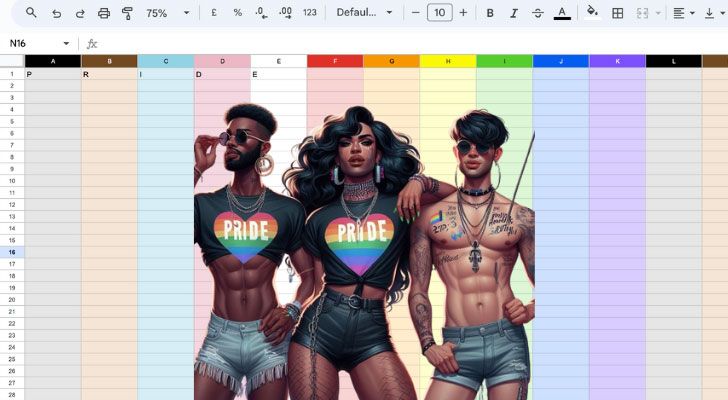
You need to open a fresh document in your Google account to begin this fun process without any delay. The very first box in the upper-left corner of the grid is widely known as cell A1 among spreadsheet users. You will place your flashing cursor inside that top square to start the activation sequence for the rainbow colors. You will enter the letter P into that box as your next move to get everything prepared properly. Your keyboard will help you start a beautiful shift in how the screen looks after you finish typing.

Move your cursor immediately to the right into cell B1 for the next step of the hidden trick. You will enter the letter R in that second column without adding any extra punctuation or spaces this time. Users will notice that nothing happens quite yet because the magic word remains completely incomplete at this point. You need to fill out the remaining letters in a neat row across the top of your document. Cell C1 receives the letter I while cell D1 takes the letter D to move further along the path.
Finalize the sequence by placing the letter E inside cell E1 to complete the secret word fully. The entire grid changes instantly into a bright spectrum of color once you hit the enter key on your keyboard. Columns light up with a gorgeous layout that looks like a beautiful party on your desktop monitor. You will see rows of neon shades that make data entry feel like a fun party for everyone in the room. Dull spreadsheets become bright fields of color that will make you smile during a long afternoon of office work.
Type one letter per box across the very top row of your online spreadsheet. Each block must hold exactly one character to make the secret mechanism function properly.
Press the enter key after you finish the word to watch the grid shift. The transformation happens in a split second as the system reads your input.
Look at the colorful bars that stretch all the way down the screen. Your ordinary work document turns into a lively display of visibility instantly.
The Magic Words Across Different Languages
Global users will be happy to know that the secret feature functions perfectly in multiple languages across the internet. You are able to use the Spanish word ORGULLO if you want to try something completely different today. Each letter needs its own cell starting from the top-left corner just like you did with the English word. The columns will burst into a bright spectrum the moment you type the final letter O in the sequence. People around the world have the ability to enjoy the same bright graphics using their native vocabulary words.
Portuguese speakers have a special option available for their spreadsheet documents as well when they feel festive. You will type the word ORGULHO across seven cells in the top row to activate the colorful feature instantly. The grid reacts immediately to this input by spreading colors across your work screen to make you happy. Your spreadsheet will look like a carnival in Brazil once the letters are in place in the correct boxes. Select the cells carefully to ensure you do not make any spelling mistakes during the quick process.
Japanese characters also activate the wonderful rainbow columns on your office computer without any complicated setup steps. You will enter the characters プライド into the spreadsheet to witness the exact same transformation on your display. The system detects the terms across global boundaries to show support for visibility inside corporate office spaces. Your screen will display a beautiful arrangement of tones that brightens up any dull day of administrative labor. People everywhere love how easy it is to bring some flair to a regular document using these international terms.
Input the Spanish word ORGULLO across seven cells to see the change. The system processes international terms to accommodate users from different countries.
Utilize the Portuguese version ORGULHO for an identical visual result. Every single letter must occupy its own separate box along the first row.
Write the Japanese katakana characters into the grid for a global experience. The software responds to various languages to spread the fun worldwide.
Case Insensitivity Makes Typing Completely Foolproof
Capital letters are not required when you want to trigger the colorful spreadsheet background on your laptop. You are able to use lowercase letters if you prefer a softer typing style during your morning shift. The software automatically interprets the text regardless of how you hit the shift key on your keyboard. Text formatting will not interfere with the secret command inside the system at any point in time. You will achieve the same vibrant outcome with either big or small letters inside the top row.
A mixture of upper and lowercase letters together still activates the secret rainbow background flawlessly without any errors. You will find that typing a capital P followed by lowercase letters works perfectly fine for this trick. The code behind the grid searches for the spelling rather than the text size of the characters. Mistakes are hard to make when the program is so forgiving with your keyboard input every single day. Your document will bloom into a bright display even if you type carelessly while talking to your friends.
Relaxed rules mean that anyone has the opportunity to enjoy the bright display without any technical stress or worry. You do not need to worry about holding down the shift key while working on your regular data. The software focuses entirely on the sequence of the characters you enter into the grid from left to right. Simple functions like this make the online application very friendly for everyday users who dislike complicated technology. Your screen will burst into a bright pattern the moment the last letter arrives in its designated spot.
Type the word using all lowercase letters to keep things simple. The spreadsheet will instantly read the word and recolor the background.
Combine large and small letters if you want to test the system. The background responds immediately to any variation of the correct spelling.
Avoid worrying about exact text formats when entering the code. The software is designed to be highly flexible for every user.

ORGULLO - Spanish

PRGULHO - Portuguese

プライド - Japanese
The Intersex-Inclusive Progress Flag Visual Design
The visual pattern that appears on your screen is a beautiful representation of total inclusion for everyone. You will notice traditional stripes alongside newer design details that honor diverse groups in our society. The left side of the sheet contains a special wedge with distinct color tones that look very striking. Purple circles on a yellow background represent the intersex portion of the flag within this custom software update. Your spreadsheet becomes a wonderful canvas that showcases a message of total acceptance to anyone who views it.
Black and brown stripes are included to highlight people of color within the broader social movement. You will also see light blue, pink, and white lines that represent transgender people on the screen. The classic rainbow shades fill the rest of the columns to complete the beautiful emblem across the grid. Software designers made sure to include every part of the current flag layout for maximum historical accuracy. Your daily work files will look incredibly fashionable with these meaningful colors spread out across your computer monitor.
A glance at the colorful pattern gives a quick break from your boring business numbers during the day. You are able to appreciate the detailed layout while you fill out your regular data on the screen. The colors remain bright and clear on high-definition office monitors without fading into the dull background grid. Many people feel a sense of pride when they open a sheet with this design on their computers. Your computer will become the most colorful station in the entire office building because of these secret letters.
Observe the distinct wedge shape on the left side of your document. The yellow and purple sections represent intersex visibility within the design.
Check the blue and pink lines that stand for transgender representation. The colors are arranged accurately to match the official pride emblem.
Enjoy the bright rainbow bars that cover the remaining data columns. Your workspace becomes a lively tribute to equality and historical progress.
Google Spreadsheet Pride
Spacing Out Your Letters For The Same Effect
Users are able to insert spaces between the letters and still get the rainbow columns to appear. You will find that typing p r i d e with spaces works just as well on your screen. The system ignores the empty gaps to focus entirely on the alphabetical order of the typed characters. Spaces allow you to stretch the word across a wider section of the top row of boxes. Your spreadsheet will still transform into a beautiful display of inclusive colors despite the large empty spaces.
Spaced formatting gives you more control over how the top row appears to people viewing your document. You are able to skip blocks to create a custom look for your file without ruining the trick. The underlying code remains active as long as the letters appear in the correct order from left to right. Creativity with your layout makes data management feel far less tedious during a long afternoon at your desk. Your document will maintain its colorful background even with the added spaces between each of the letters.
A little experimentation with different gaps is a fun way to interact with the spreadsheet software today. You will see the magic happen the moment the final letter E is pressed on your keyboard. The columns respond to the secret phrase regardless of the wide spacing you choose to implement here. Friends will be amazed when they see a spaced-out word trigger a giant rainbow across the entire grid. Your screen will shine brightly to make your regular routine feel like a grand party for everyone involved.
Place a blank cell between each letter of the magic word. The program filters out the empty spaces to read the underlying text.
Check that the alphabetical order remains correct from left to right. The color shift will fail if you mix up the placement of characters.
Use the spacebar method to make the word look more dramatic. Your top row will look distinct while maintaining the beautiful hidden feature.
Impressing Your Coworkers With Spreadsheet Magic
A quick demonstration of this funny trick with office friends is a great way to connect during breaks. You are able to show people how to brighten up their boring work documents with very minimal effort. The entire office will talk about the sudden burst of color on your laptop monitor after you type. Coworkers will want to learn the secret combination to try it on their own digital files immediately. Your reputation as a spreadsheet wizard will grow among the staff members who appreciate a good laugh.
A pre-loaded rainbow file sent to your team will liven up a dull morning meeting or presentation. You will surprise everyone when they open the link during an ordinary review session on their computers. The sudden appearance of the Intersex-Inclusive Progress flag creates an instant conversation starter among your corporate peers. People will forget about their stressful deadlines for a few amusing moments while they look at the screen. Your digital workspace becomes a place of inclusion and friendly office humor that everyone is able to appreciate.

Instruction on how to unlock the hidden graphics spreads happiness around the department during a slow week. You are able to help your closest colleagues express themselves through their daily work applications without any difficulty. The trick requires no special coding knowledge so anyone is able to perform it within a few seconds. Simple office pranks like this bring a sense of lighthearted fun to a corporate environment that feels dry. Your friends will thank you for making their computer screens look so fabulous during their regular shifts.
Open a team document and type the secret word before a meeting. The sudden burst of color will greet everyone as they log into the system.
Show a nearby colleague how to activate the colorful bars on their screen. Small surprises help break up the monotony of long data-entry tasks.
Leave a rainbow spreadsheet open on your screen during lunch breaks. People walking past your desk will notice the beautiful design right away.
Removing The Colors When Work Gets Serious
Removal of the magic word from the top row will remove the rainbow columns instantly from view. You will see the standard white and gray grid return to your screen immediately without any issues. The software clears the decorative theme as soon as the text disappears from the first five cells. Regular formatting comes back without leaving any permanent changes behind in your document for your peace of mind. Your file will look completely professional again for any strict corporate review or management meeting this afternoon.
Erasure of the text takes only a single press of the backspace key on your office keyboard. You are able to toggle the colorful easter egg on and off at any moment you choose. The spreadsheet does not save the rainbow permanently unless the letters stay in place inside the boxes. Bosses will never know you had a pride party on your screen five minutes ago during work. Your data remains perfectly intact regardless of how many times the colors shift back and forth today.
Concealment of your fun workspace is useful if a strict client arrives unexpectedly at your office desk. You are able to simply highlight the top row and press delete to clear the theme quickly. The transition back to a normal document happens without any lagging or software errors on your machine. Normal business operations are able to resume without any visible trace of the colorful display on the screen. Your secret remains safe until you decide to type the letters back into the boxes for fun.
Select the cells from A1 to E1 and hit the backspace button. The default grid appearance will return to your screen in a split second.
Cut the text out of the row to store it for later use. Your spreadsheet will revert to a plain corporate document immediately.
Overwrite the letters with regular data to remove the easter egg style. The system prioritizes standard numbers over the secret pride theme.
Troubleshooting Your Rainbow Spreadsheet Issues
Sometimes the rainbow columns fail to appear after you type the letters into the spreadsheet grid squares. You need to ensure that you started in cell A1 and not somewhere else by accident. The sequence will not trigger if you accidentally skip the very first block in the corner row. Check your spelling to make sure you did not leave out a necessary letter during the process. Your input needs to follow a straight horizontal line across the top row to activate the system.
Internet connection issues occasionally cause the application to lag during the activation of the secret feature. You will want to refresh your web browser if the colors do not load quickly onto your monitor. The feature relies on updated software versions to display the newer progress flag design on your screen. Old web browsers are unable to render the complex visual elements properly because of outdated code structures. Your computer hardware needs a stable connection to process online spreadsheet commands without any annoying software delays.
Insertion of numbers inside the secret cells will break the activation code immediately for the user. You should keep extra characters away from the top row while using the hidden pride feature today. The software looks for an exact alphabetical match before changing the background style into a rainbow theme. Clear any extra symbols out of the way to allow the rainbow to shine across your monitor. Your troubleshooting efforts will succeed once you follow the basic spelling rules carefully from the very beginning.
Verify that each letter sits in its own separate block along the top. The background will remain gray if you bunch multiple characters into a single cell.
Reload the online document if the interface freezes up entirely. A quick refresh resolves most loading issues with the hidden script.
Remove any extra punctuation marks that interfere with the text. The system requires plain letters without commas or periods to work.
History Of Google Software Easter Eggs
Software programmers love to tuck funny secrets into everyday applications for people to find during work. You will discover many hidden surprises if you know the right codes to type into search boxes. The tech world calls these hidden treats easter eggs because they require searching through the system files. Developers create them to show personality and honor special cultural moments throughout the calendar year with style. Your standard online search engine contains dozens of these funny features that make technology feel more human.
Insertion of the pride theme inside spreadsheets is a tradition that started several years ago for visibility. You will see that tech companies use their software to promote diversity and broad inclusion for everyone. The Intersex-Inclusive Progress flag design represents the latest update to this particular spreadsheet secret within the system. Updates ensure that the visual output matches current historical symbols accurately for the user. Your favorite online programs often contain messages of social support hidden beneath the surface of the interface.
Discovery of these secrets makes using office software feel like an exciting treasure hunt for regular workers. You are able to connect with the creators of the software through their hidden messages and tricks. The spreadsheet team updates the code regularly to keep the secret working smoothly on your computer screen. Millions of users around the globe look for these fun additions every single year during special months. Your workday gets a little bit brighter whenever you uncover a new software trick inside your browser.
Research other secret codes to find more entertainment within your browser. Programmers build various tricks into search bars and map applications.
Appreciate the effort required to program these colorful hidden graphics. Software engineers spend extra time creating fun content for the public.
Follow internet tech blogs to stay updated on new hidden features. Updates occur frequently to reflect current cultural events around the globe.
Sharing The Pride Spreadsheet With Your Friends
Delivery of a colorful link to your partner is a marvelous way to spread cheer today. You will be able to share a funny moment during a busy afternoon at your desk. The simple act of typing five letters brings a smile to anyone who sees the screen. Friends will love opening a document that bursts into a rainbow immediately right in front of them. Your social circle will appreciate the fun trick and spread it with others who enjoy spreadsheets.
Group documents become much more lively when you activate the colorful columns for everyone on your team. You are able to collaborate on project data while surrounded by beautiful representation on your computer monitor. The bright colors make joint tasks feel less like a chore and more like a game today. People who access the file will see the rainbow design on their own screens instantly without delays. Your common files will become the most popular documents in your entire social group because of this.
Entry of the secret word into a public file creates an immediate visual statement for everyone. You will show your support for visibility without needing to write a long essay about the topic. The message is clear and colorful for every single person who opens the page on their laptop. Simple steps allow you to distribute a little bit of happiness across the internet with zero cost. Your digital network will grow closer as everyone spreads the funny spreadsheet trick to their own friends.
Email the modified link to your close friends for a funny surprise. The rainbow pattern will load automatically when they click the URL.
Post a clip of the visual transformation onto your social media account. Online followers will love to see the hidden tech trick in action.
Create a public template that features the Intersex-Inclusive Progress design. People will use your colorful setup to liven up their own online files.
Why Software Secrets Bring People Together
Laughter and surprise are wonderful experiences that connect people across the internet every single day. You will feel a sense of belonging when you discover a hidden cultural feature in your application. The spreadsheet application becomes a fun alternative to a place for boring numbers and cold charts. Small details show that software developers care about representation and visibility for all kinds of people. Your computer screen becomes a small beacon of support during the regular workday inside your office booth.
Revelation of hidden features gives you a reason to pause and smile at your desk today. You are able to take a brief mental break from your stressful office duties and tasks. The colors remind everyone that inclusivity belongs in every corner of life including our business software applications. Positive messages are able to spread quickly through simple digital tricks like this across the corporate network. Your mood will improve as you gaze at the bright columns of progress flag colors on display.
Activity with colorful grids changes your entire outlook on daily administrative tasks during your office shift. You will notice that a little bit of color goes a long way in a gray workspace. The software trick brings a touch of human warmth to a cold digital environment for everyone. Everyone deserves to see their identity represented in the applications they use daily for their jobs. Your online spreadsheet will remain a source of cheerful pride whenever you open it on your monitor.
Keep the secret code active to maintain a bright working atmosphere. The colorful environment helps reduce the stress of repetitive office assignments.
Pass the background history of the flag to interested coworkers. Education on inclusivity makes the workplace friendlier for every single person.
Enjoy the positive atmosphere that a simple easter egg creates daily. Small additions to software make a massive difference in your daily happiness.
Fun Creative Uses For Your Colorful Spreadsheet
Organization of a personal event becomes much more entertaining with a rainbow background on your laptop screen. You are able to organize guest lists while surrounded by beautiful flag colors that bring happiness. The bright layout keeps your spirits high as you sort out your calendar dates for vacations. Boredom will disappear completely when your organization system looks like a grand festival of inclusive colors today. Your planning files will stand out from any ordinary document you have stored online in your account.
Measurement of your fitness milestones is another excellent option for this colorful theme during your week. You will feel motivated to fill out your exercise rows every single evening before bed. The vibrant backdrop makes the recording of your healthy habits feel like a reward for your hard work. Fitness records look way better when they are framed by beautiful progress colors on your screen. Your health routine will receive an extra boost of style from the hidden graphics inside the system.
Formation of a custom chore list will help keep your household organized and happy every week. You are able to assign daily tasks underneath the bright rainbow columns easily without any confusion. The visual flair turns basic house duties into an interactive and funny game for your family. Roommates will actually enjoy checking the document when it looks so incredibly festive on their phones. Your home administration files will become a fun centerpiece for everyone to view during house meetings.
Build an interactive calendar that utilizes the full spectrum of colors. The visual layout makes checking your upcoming schedule very exciting.
Organize a holiday guest list inside the vibrant grid structure. Party preparation becomes much more lighthearted when the sheet looks festive.
Monitor your daily hobby progression using the progress flag columns. A colorful display helps you stay consistent with your fun personal activities.
Keeping The Magic Alive Throughout The Year
Pride celebrations do not have to end when the month of June finishes on the calendar. You are able to keep the rainbow active during the entire winter season too for fun. The spreadsheet software maintains the secret easter egg all year long without any expiration date at all. Visibility is a full-time reality that belongs in every single month on your busy schedule. Your files will remind you of love and diversity during the coldest winter days of the year.
Access to a colorful document on a rainy morning gives an immediate energy boost to your brain. You will find comfort in the bright colors when office work feels tedious and totally exhausting. The software trick stays ready for activation whenever you need a quick smile at your desk. Consistency with your colorful theme keeps your work spirit alive and well during difficult business quarters. Your digital desktop remains a welcoming space for everyone throughout the four seasons of the year without change.
Distribution of knowledge about this feature ensures that the trick stays popular online for a long time. You are able to pass the secret down to new employees who join your team today. The continuous use of the easter egg shows that representation is always relevant in our society. Simple digital traditions help maintain a friendly atmosphere in a harsh corporate world that feels very cold. Your spreadsheet will continue to shine with beautiful inclusive tones for many years to come in the future.
Keep the secret letters saved in your favorite personal templates. The rainbow colors will load automatically every time you start a new file.
Remind your online friends about the trick during autumn or winter. Seasonal blues disappear quickly when a bright spreadsheet lights up your desk.
Leave the easter egg active to show permanent support for visibility. Your dedication to a colorful and welcoming digital space will remain clear.
Accessible Technical Tricks For Casual Spreadsheet Users
Education on how to use digital spreadsheets does not require advanced corporate training or computer science degrees. You are able to master simple visual adjustments with a few clicks on your mouse pad. The secret pride easter egg is one of the easiest modifications available in spreadsheet software. No complicated formulas are needed to make your entire document change its background appearance instantly. Your screen will transform into a beautiful display with minimal effort from your fingers.
Grid manipulation becomes an absolute blast when you focus on the visual options instead of math. You will feel confident as you explore the hidden menus and commands inside your web browser. The application is designed to reward curiosity with funny little secrets that brighten up your day. Anyone is able to participate in this colorful digital transformation without feeling left behind by technology. Your daily work files give a perfect playground for testing these simple keyboard combinations safely.
Simple tricks help build user confidence when dealing with complex data management platforms on computers. You will notice that your overall familiarity with the application grows as you play around. The secret letters open up a portal to a much more enjoyable digital workflow experience. People who discover these features tend to enjoy their office work to a higher degree than before. Your computer will become a source of entertainment while you perform your basic assignments.
Explore the top row of your online document to find new ways to type. Simple text inputs are able to completely shift how your workspace looks today.
Practice typing the secret words in different languages to test your keyboard. The software responds accurately to multiple cultural vocabularies around the globe.
Pass your newfound knowledge to friends who find spreadsheets boring. Visual surprises make data management far more attractive for casual computer users.
The Final Verdict On Spreadsheet Rainbow Secrets
Hidden features give an excellent way for software creators to communicate with their users directly. You are able to see the human side of technology through these colorful easter eggs. The Intersex-Inclusive Progress flag design brings a necessary message of visibility to everyone. Spreadsheets do not have to be cold and emotionless spaces for business data only. Your daily office routine will improve when you add a touch of pride to it.
Entry of the magic word requires minimal effort but gives a massive psychological reward during work. You will find that a bright computer screen makes your entire afternoon feel faster. The inclusion of diverse cultural symbols shows that tech platforms value all people equally. Simple combinations of letters allow anyone to transform their digital environment in seconds. Your spreadsheet files will remain a colorful testament to equality whenever you use them.
Every single person deserves to feel represented while they work on their daily tasks. You will be able to carry a message of pride wherever your career path leads. The rainbow grid is a beautiful reminder that love and diversity win every single time. Software secrets like this show that small hidden details have a great impact. Your online document will always be ready to display a wonderful festival of life.
Activate the colorful columns whenever you need an extra dose of happiness. A quick layout change has the ability to turn a stressful day into a fun experience.
Keep the secret phrase in mind whenever you use spreadsheet software. Small easter eggs connect the internet public with creative software designers worldwide.
Enjoy the wonderful combination of technology and social visibility today. Your screen will look absolutely spectacular while you complete your regular assignments.
Pride Rainbow Merchandise
We earn a commission if you click the link below and make a purchase at no additional cost to you.

Google Spreadsheet Pride [The Intersex-Inclusive Progress Pride] Bringing Us Together
Discovery of this marvelous hidden feature shows how simple text alters your whole digital environment completely. You will always be able to bring a huge splash of color to your computer screen with five small letters. Your daily routines will feel much more lighthearted with this secret theme active.
International words like ORGULLO and プライド give the trick a fantastic global reach for everyone. You are able to experiment with different languages to see the exact same gorgeous design easily. Your spreadsheet skills will impress your close office friends while spreading visibility across the corporate floor.
Enjoy the beautiful Intersex-Inclusive Progress flag layout during your regular data tasks from now on. You do not need expensive software additions to make your online workspace feel incredibly welcoming and fun always. Go ahead and type the magic letters into cell A1 to enjoy the brightness today.